
Zone Coordinators (Z Series)
| Z Series: Wireless Zone Coordinator
The Pelican Zone Coordinators
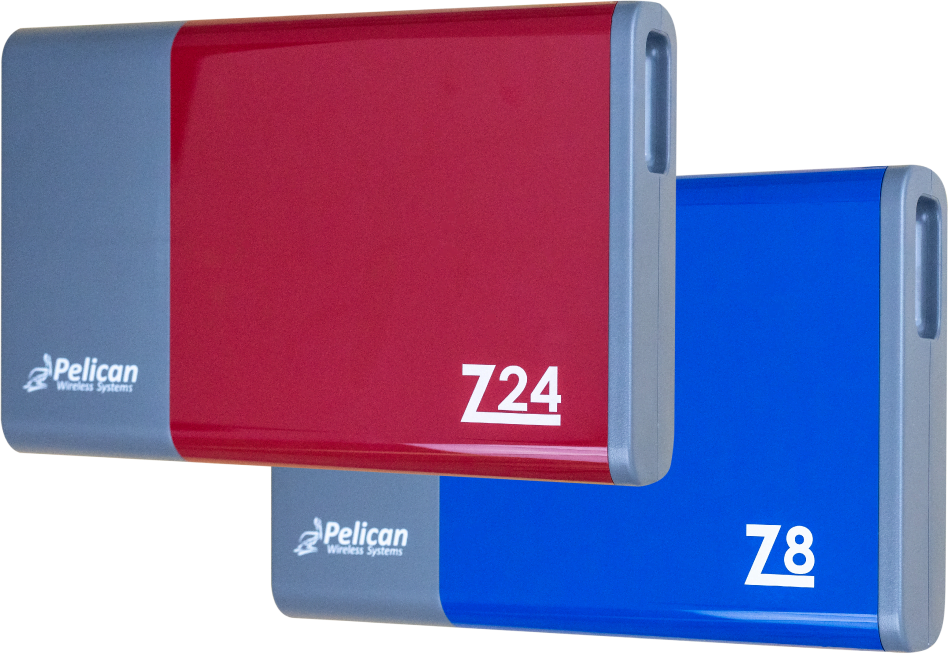
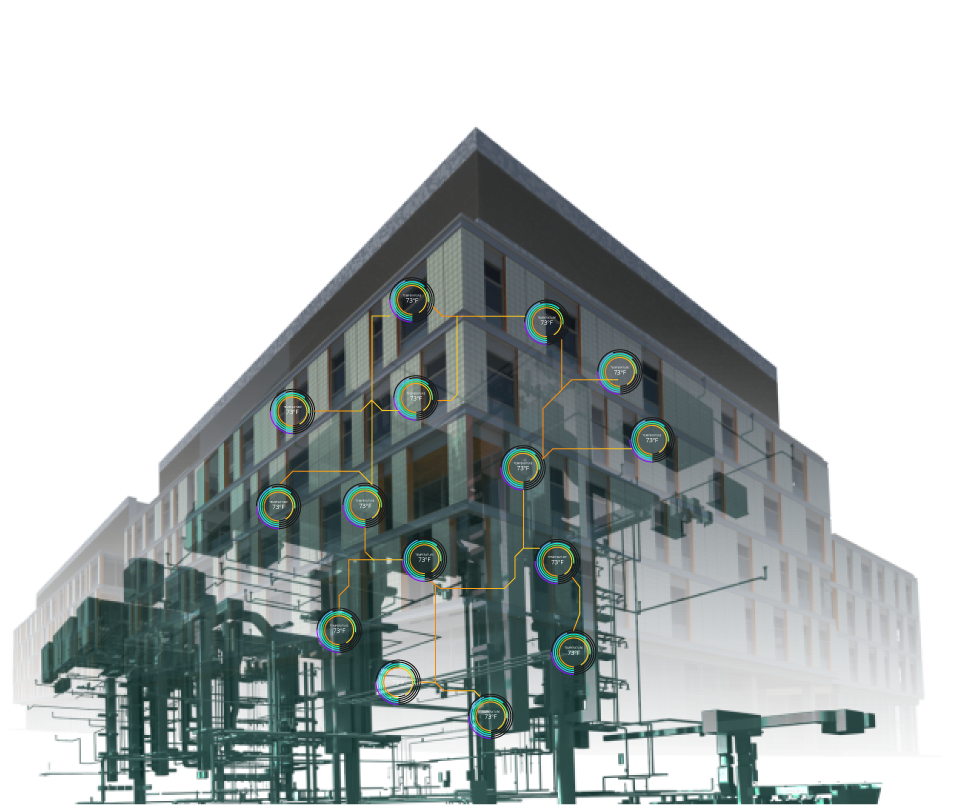
Coordinate Multiple Thermostat’s Demands to a Centralized Equipment Controller for Unified Operation.
The Pelican zoning solution‘s basis of design is built around incorporating multiple zone thermostat’s demands to directly affect what is active at equipment that is common to all zones.
Pelican uses their wireless mesh technology to establish real-time communication between multiple Pelican thermostats to one or more Pelican zone coordinators: the Z8 or Z24. This real-time transfer of information turns a seemingly separate mechanical system into a single efficient ecosystem.
As zone thermostats adjust their demands (heating, cooling and/or ventilation), the zone coordinator will optimize the output of the equipment it is controller to properly affect the overall building’s climate.
2 to 8 Zone Coordinator
Z8
The Z8 is used to manage central equipment that provides heating, cooling, and/or ventilation to up to eight (8) Pelican thermostats.
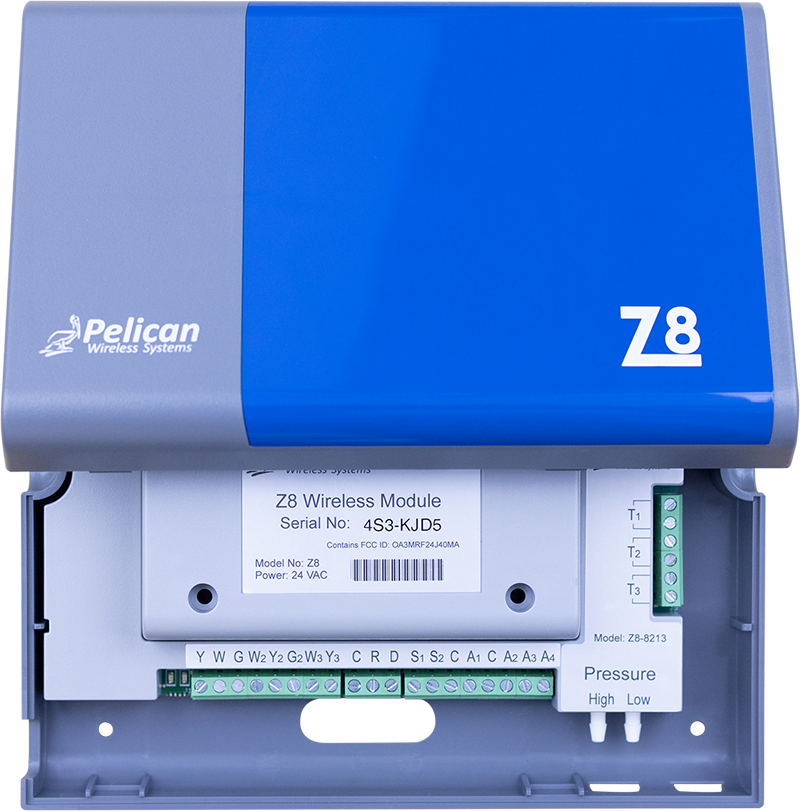
9 to 30 Zone Coordinator
Z24
The Z24 is used to manage central equipment that provides heating, cooling, and/or ventilation to up to thirty (30) Pelican thermostats.
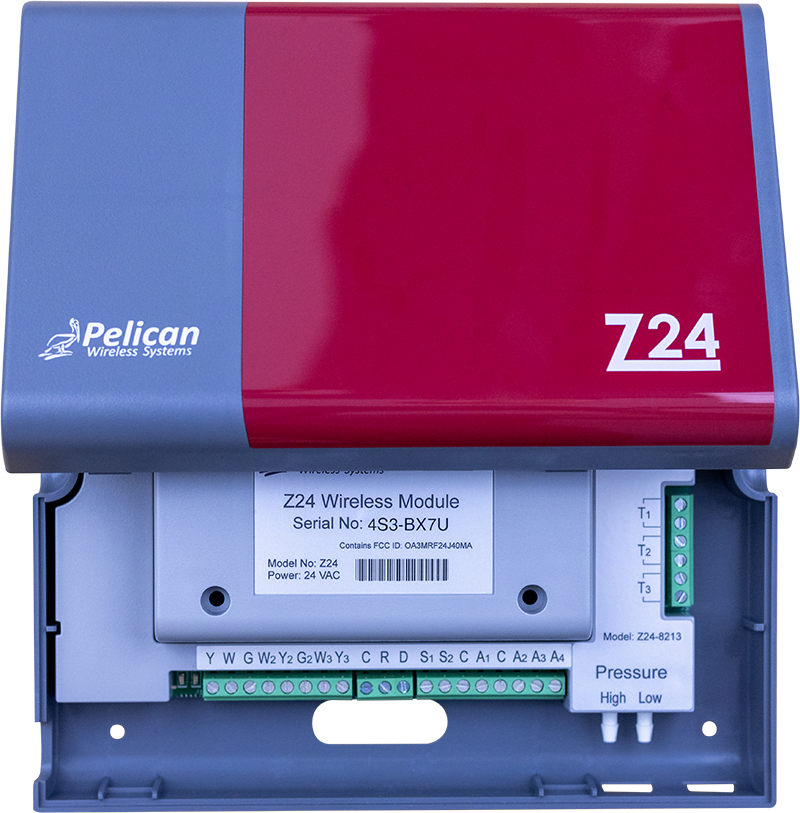
There are two components to each Zone Coordinator:
The Antenna:
The antenna of the Z8 and Z24 comes mounted inside the output module of the controller. In applications where the output module is installed inside the building, the antenna can remain mounted inside the controller. In applications where the output module is mounted inside the equipment it is controlling, the antenna can be mounted inside the building and only requires three (3) standard thermostat wires to communicate with the controller.
All networking communication, logic algorithms, and configurations are stored inside the antenna.
The Output Module:
We made it convenient to mount the output module of the Z8 and Z24 at the equipment is is controlling, even if the equipment is not close to where your Pelican wireless network is. The output modulate can be installed inside the equipment, while the antenna can be mounted inside the building. The antenna only requires three (3) standard thermostat wires to communicate with the controller.
The output module houses all the relays, sensors, and digital outputs of the controller.
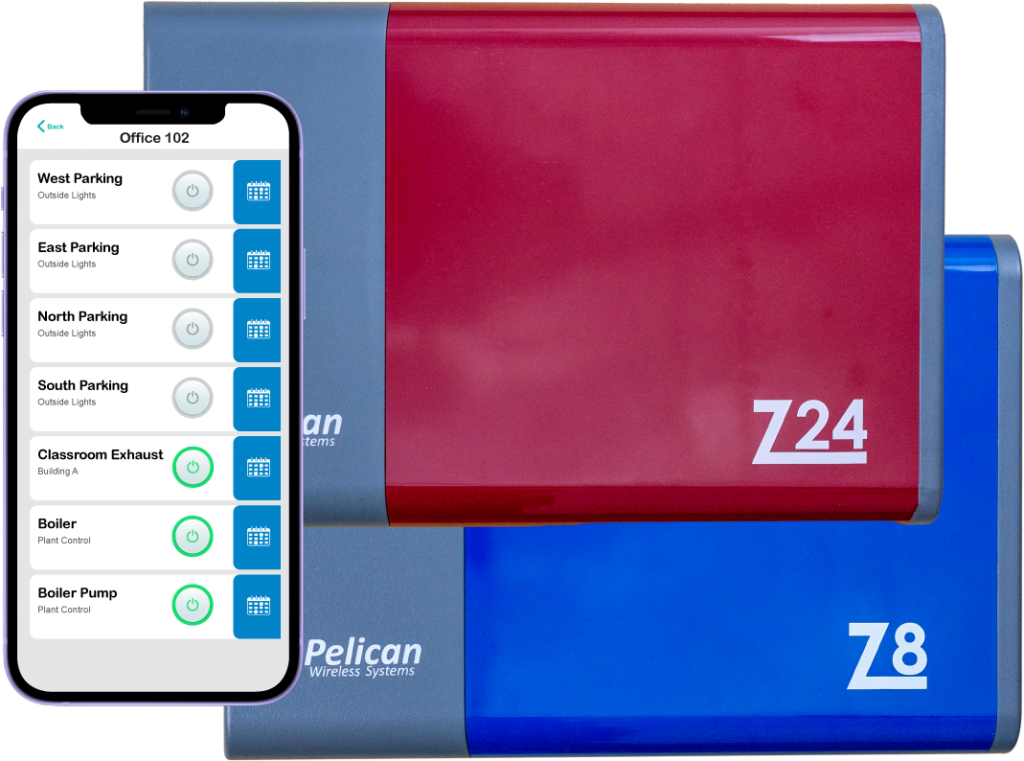
| Web-App enabled control.
Right from the Pelican App you can manage all aspects of the Pelican Zoning Solution: change configurations, schedules on/off periods, set vacation schedules, manage event schedules, view historical data, and more.
| Zone CoordinatorInputs and Outputs
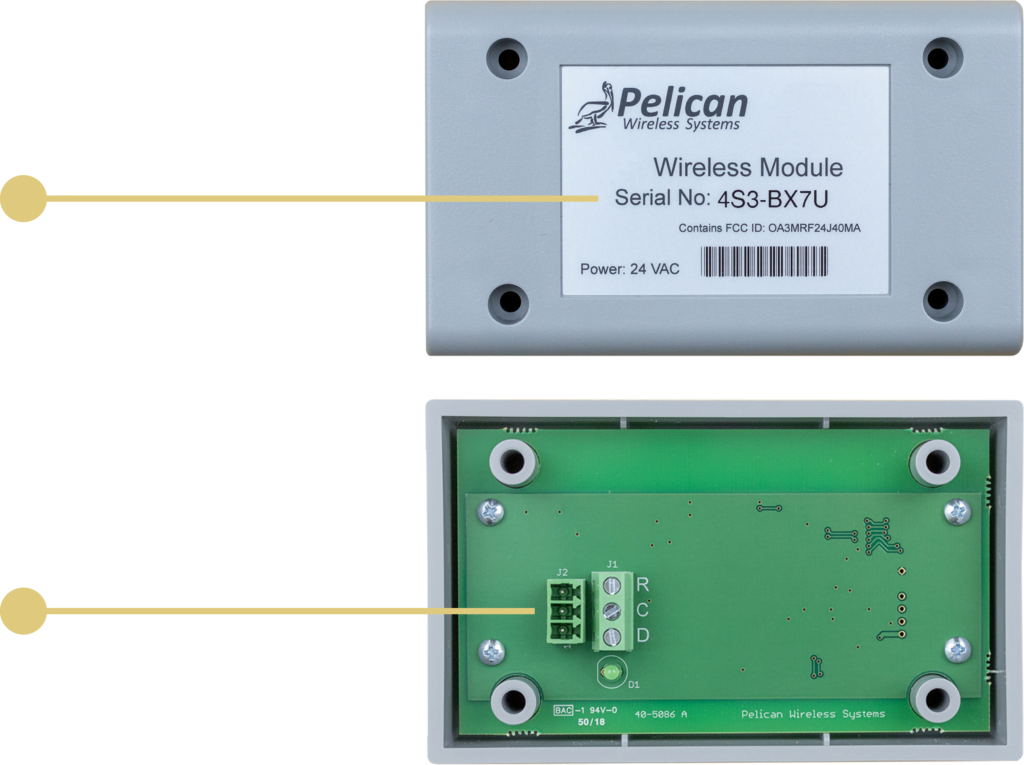
WIRELESS ANTENNA
Serial Number (XXX-XXXX)
The zone coordinator’s antenna is identified on your Pelican Connect™ App through a unique identifier. Once connected, the controller can be named according to the equipment it is controlling.
3-WIRE ANTENNA HOOKUP
(R, C, D) 3-Wires
The Zone Coordinator’s Antenna communicate and receives 24VAC power over a low-voltage three wire connection to the Output Module. R: 24 VAC, C: Common, D: Data.
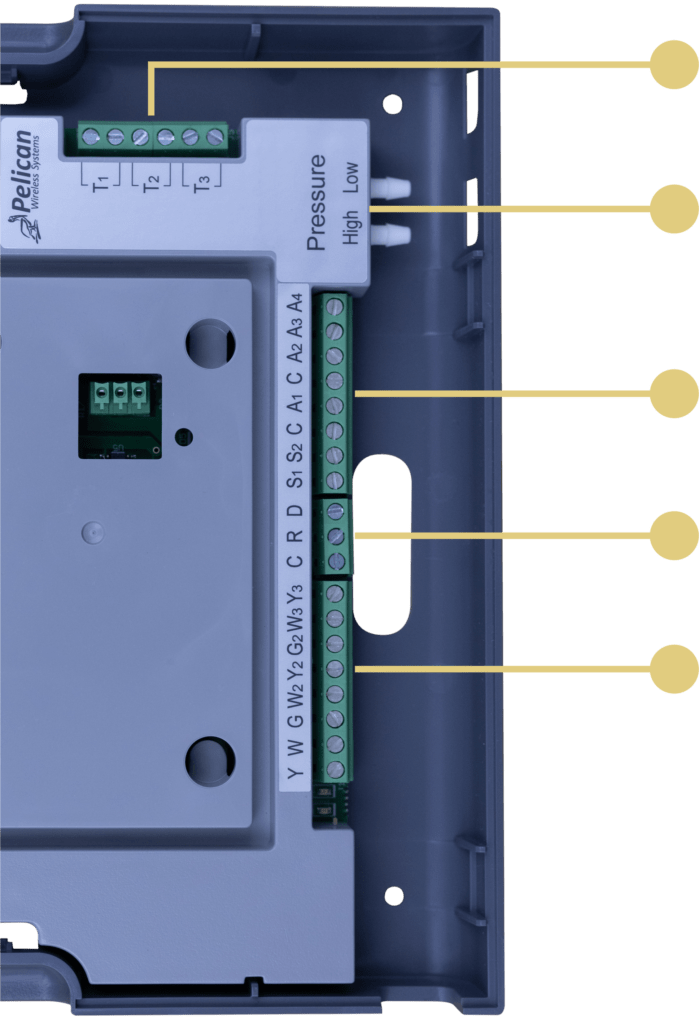
EXTERNAL INPUTS
(T1, T2, T3) 10K Type II or Dry-Contact
Pull in up to three external temperatures. Most commonly discharge, return, and/or outside temperatures. *A forth external temperature sensor can be added to a Z8 or Z24 by wiring a Pelican TA1 to the controller’s R, C, D terminals.
DIFFERENTIAL PRESSURE INPUT
(HIGH & LOW) Pressure Sensor
Connect a pressure tube directly into the built-in differential pressure inputs of the Z8 and Z24. The controller will monitor this pressure and make equipment adjustments to maintain targeted settings.
MODULATING OUTPUTS
(A1, A2, A3, A4) 0 - 10 VDC Signals
Four modulating outputs that are most commonly used for outside damper, variable speed fan, bypass damper, and/or modulating temperature control.
ANALOG INPUTS
(S1, S2) 0 - 10 VDC Signal
When used as an outside air damper controller, the Z8 and Z24 accepts a feedback signal to confirm the outside damper is in the correct position.
CONNECTION TO ANTENNA
(R, C, D) 3-Wires Only
The Z8 and Z24’s output module can be installed at the equipment it is controlling and its Antenna in another location. The two devices communicate over a three wire connection. This is also the 24VAC power input for the Pelican controller. R: 24 VAC, C: Common, D: Data.
DIGITAL OUTPUTS
(Y, Y2, Y3, W, W2, W3, G, G2) HVAC Unit Control
The Z8 and Z24 will enable the equipment’s heating, cooling, and fan stages through standard 24VAC outputs. During an economizer or demand ventilation cycle, the (G2) output can be used to turn on exhaust fans or open a damper.
The Zone Coordinator’s Antenna communicate and receives 24VAC power over a low-voltage three wire connection to the Output Module. R: 24VAC C: Common, D: Data.
The Z8 and Z24’s output module can be installed at the equipment it is controlling and its Antenna in another location. The two devices communicate over a three wire connection. This is also the 24VAC power input for the Pelican controller. R: 24VAC C: Common, D: Data.
MOMENTARY CONTACT SWITCH INPUT
The Zone Coordinator’s Antenna communicate and receives 24VAC power over a low-voltage three wire connection to the Output Module. R: 24 VAC, C: Common, D: Data.
The Z8 and Z24’s output module can be installed at the equipment it is controlling and its Antenna in another location. The two devices communicate over a three wire connection. This is also the 24VAC power input for the Pelican controller. R: 24 VAC, C: Common, D: Data.
STATUS LIGHTS
Relay State
When the relay is closed, the green LED light next to the relay will be lite. This is also viewable through the Pelican App.
| Common Air Handler Applications
Variable Air Volume & Temperature (VVT) Air Handler Coordinator
In Variable Air Volume and Temperature (VVT) applications, a Pelican Zone Coordinator (Z8 or Z24) manages a central air handler to provide heating, cooling, and ventilation to multiple zones, and a bypass damper to maintain the correct amount of airflow going into active zones. Multiple Pelican zone thermostats (TC or TS Series) will open, close, or float their own zone damper to allow heating, cooling, and/or recirculated/ventilated air into its space to maintain the room’s set-points.
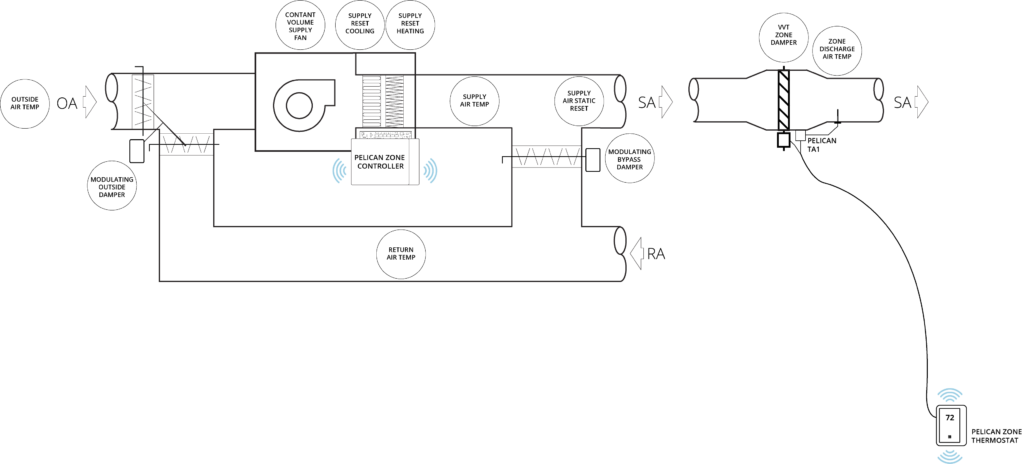
VVT Control Features:
COORDINATED
ZONE DEMAND
Each Pelican thermostat (TC or TS Series) communicates its demands to the Pelican zone coordinator (Z8 or Z24). The zone coordinator optimizes the output of the air handler to positively affect the overall building’s climate. The Pelican zoning solution’s architecture is built around this real-time relation between zone thermostat demand and air handler airflow/temperature adjustment.
HEAT & COOL
CHANGE-OVER LOGIC
As demand in the building shifts between heating, cooling, and ventilation, the Pelican zone coordinator (Z8 or Z24) manages and organizes all the zone requests. The solution then adjusts the output of the HVAC equipment to accommodate the different zone heating, cooling, and ventilation needs.
SCHEDULE
OPTIMUM START
Each Pelican zone thermostat can be scheduled for Optimum Start. When a zone thermostat is set for Optimum Start, it calculates when its zone requires cooling or heating to reach its occupied temperature set-point. This optimized start algorithm helps bring a building to temperature before people arrive and is an efficient way to pre-heat or pre-cool a building.
RESET
SUPPLY AIR TEMPERATURE
The Pelican zone coordinator (Z8 or Z24) will adjust the air handler’s cooling and heating outputs, either through staging and/or modulating the equipment, to provide a supply air temperatures that matches the demand of the building. These reset algorithms both focus on increased comfort and energy efficiency of the building.
MODULATE
BYPASS DAMPER
As zones adjust the position of their VVT dampers, these position changes are continually communicated to the Pelican air handler controller (Z8 or Z24). The Pelican controller will adjust the bypass damper’s position to maintain a duct static pressure target matching the needs of the active zones. Static pressure targets are automatically adjusted, so zones always receive the correct amount of airflow.
ECONOMIZER
LOGIC
Built into the Pelican zone coordinator (Z8 or Z24) is full economizer sequencing. If the outside air temperature allows for free cooling, the Pelican coordinator will automatically begin an economizer cycle. If the building requires more cooling capacity than the outside air can provide on its own, it will engage mechanical cooling to assist in cooling the building down.
VENTILATION
MANAGEMENT
Zoned buildings require intelligent ventilation solutions to meet the different ventilation requirements of the building. The Pelican zone coordinator offers advanced ventilation sequencing algorithms to keep proper air movement across every zone. The outside damper is dynamically adjusted to maintain proper minimum ventilation rates. And if any Pelican zones thermostats with a carbon dioxide (CO2) sensors requests a demand ventilation cycle, the Pelican zone coordinator with further open the outside damper to meet the increase ventilation rate request.
SAFETIES
FAULT DETECTION AND DIAGNOSTICS
The Pelican zone coordinator (Z8 or Z24) has a variety of control safeties to help prevent mechanical issues from occurring. This includes, but is not limited to: proof of airflow, static pressure limits and auto-resets, low and high temperature limits and auto-reset, outside air temperature lock-outs, minimum mixed air temperature, and much more. Included with these safeties are a full suite of fault detection and diagnostic notifications to help you identify when a mechanical problem has been detected.
Variable Air Volume (VAV) Air Handler Controller and Coordinator
In Variable Air Volume (VAV) applications, a Pelican Zone Coordinator (Z8 or Z24) manages a central air handler to provide cooling and ventilation to multiple ducted zones; in some applications central heat is also available. The zone coordinator also modulates one or more variable speed fans to maintain the correct amount of airflow going into active zones. Multiple Pelican zone thermostats (TC or TS series) will open, close, or float their own damper to allow central air into the room. Some or all thermostats will have a local reheat capable of heating the incoming air to maintain the room’s set-point.
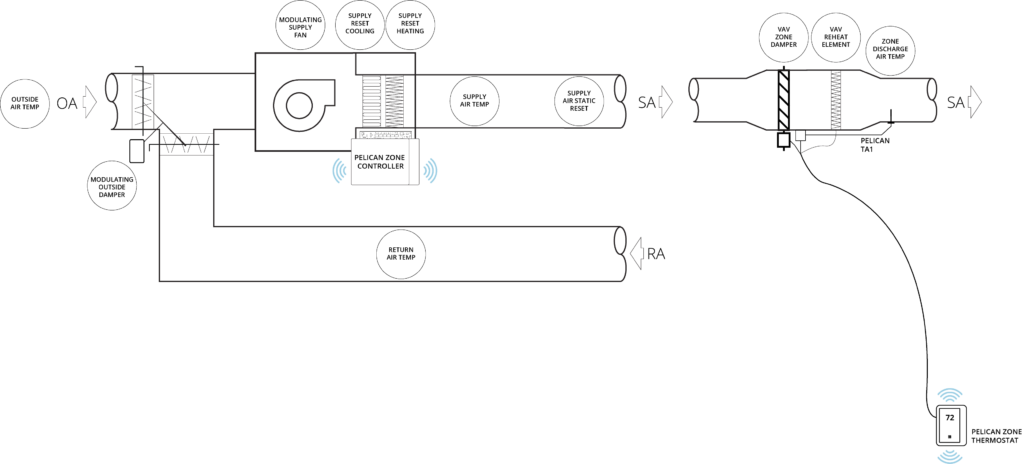
VAV Control Features:
MORNING
WARM-UP
To help bring a building to temperature after a night of being unoccupied, the Pelican zoning solution will calculate how to best use the central heat, if available, to pre-condition the building. To increase the building’s efficiency the Pelican solution will only direct a central heating cycle to the zones that need the heat. Once zone’s are at temperature, the zone thermostats will maintain their own room temperatures by using their local VAV reheats.
ZONE REHEAT
HOT WATER OR ELECTRIC
Pelican zone thermostats wired to control their own local VAV reheats, will use their reheats to maintain their room’s temperature settings. When a zone thermostats communicate to the Pelican zone coordinator (Z8 or Z24) that a reheats is active, the zone coordinator will adjust the air handler so that it is not fighting the reheats. These air handler adjustments dramatically increasing the energy efficiency of the building.
PARALLEL OR SERIES
FAN POWERED BOXES
In some applications, a Pelican zone thermostats is wired to control their own local Parallel or Series fan; normally called a Fan Powered Boxed. The zone thermostat will use their local fan to either push more air into the zone during a heating, cooling, and ventilation cycle (series box) or during a reheat cycle to pull plenum air (parallel box).
VARIABLE SPEED FAN
As zones adjust the position of their VAV dampers, these position changes are continually communicated to the Pelican air handler controller (Z8 or Z24). The Pelican controller will adjust the air handler’s fan speed to maintain a duct static pressure target matching the needs of the active zones. Static pressure targets are automatically adjusted, so zones always receive the correct amount of airflow.
Mixing Box Air Handler Controller and Coordinator
In Mixing Box applications, a Pelican Zone Coordinator (Z8 or Z24) manages a central air handler to provide cooling and ventilation to multiple zones through one supply duct and central heating and ventilation to multiple zones through a second supply duct. Multiple Pelican zone thermostats (TC or TS series) will adjust the position of a single zone actuator, which moves two mechanically linked dampers, to either bring cold air or hot air into the zone to maintain the room’s temperature set-points.
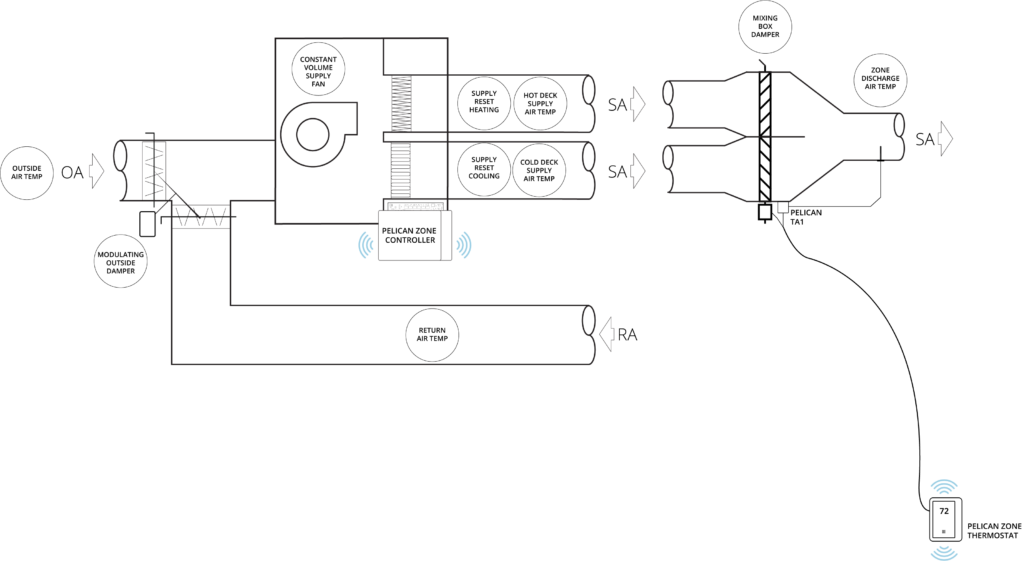
Mixing Box Control Features:
Each Pelican zone thermostat (TC or TS Series) communicates its cooling and ventilation demands to a Pelican zone coordinator (Z8 or Z24) responsible for the cold deck, while communicating its heating demands to a second Pelican zone coordinator responsible for the hot deck. The zone coordinators assists in making sure zone thermostat’s set their dampers to the correct positions as the output from the air handler(s) adjusted. The Pelican zoning solution’s architecture is built around this real-time relation between zone thermostat demand and air handler(s) airflow/temperature adjustment.
Dual Duct Air Handler Controller and Coordinator
In Dual Duct applications, there are two Pelican Zone Coordinators (Z8 or Z24) installed. One coordinator manages the temperature output of one supply duct to provide cooling and ventilation to multiple zones. And a second coordinator manages the temperature output of a second supply duct to provide heating to multiple zones. In this application one of the zone coordinators also modulates one or multiple variable speed fans to maintain the correct amount of airflow going into active zones. Multiple Pelican zone thermostats (TC or TS series) will open, close, or float two separately actuated dampers, where one damper opens to provide heat and the second damper opens to provide cooling into the room, to maintain the thermostats set-points.
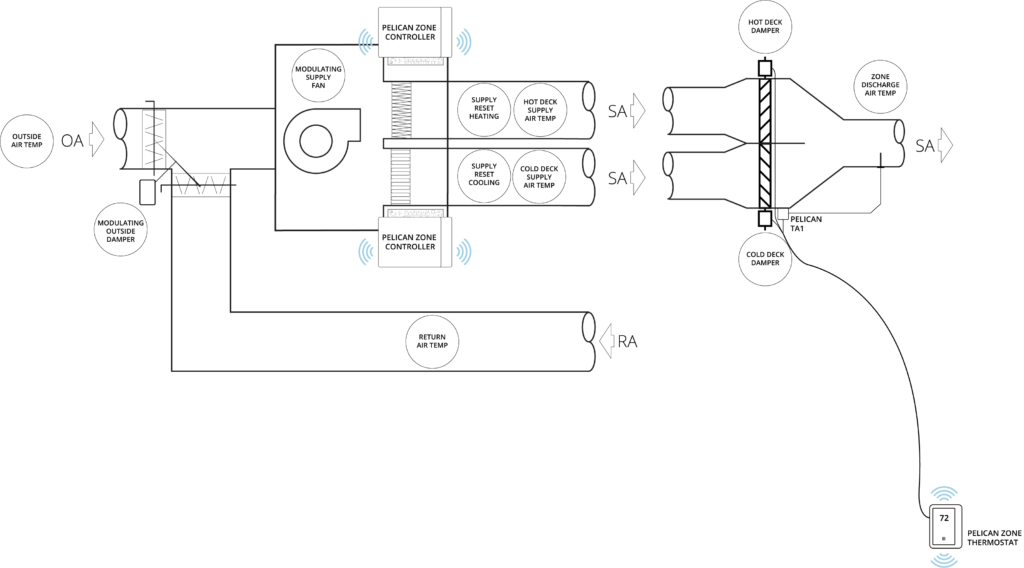
Dual Duct Control Features:
Each Pelican zone thermostat (TC or TS Series) communicates its demands to both a Pelican zone coordinator (Z8 or Z24) that manages the cold deck and a separate one that manages the hot deck. These zone coordinator assists in making sure zone thermostat’s set their hot and cold deck dampers to the correct positions as the output from the air handler is adjusted. The Pelican zoning solution’s architecture is built around this real-time relation between zone thermostat demand and air handler airflow/temperature adjustment.
The two Pelican zone coordinators (Z8 or Z24) will adjust their section of the air handler’s cooling and heating outputs, either through staging and/or modulating the equipment, to provide a supply air temperatures that matches the demand of the building. These reset algorithms both focus on increased comfort and energy efficiency of the building.
| Common Water-Plant Applications
Boiler Controller and Coordinator
In applications, where there are one or more boilers, a Pelican zone coordinator (Z8 or Z24) can be used to enable and reset the output of the boiler(s). The most common applications are WSHP condenser water-loops and two-pipe or four-pipe climate systems.
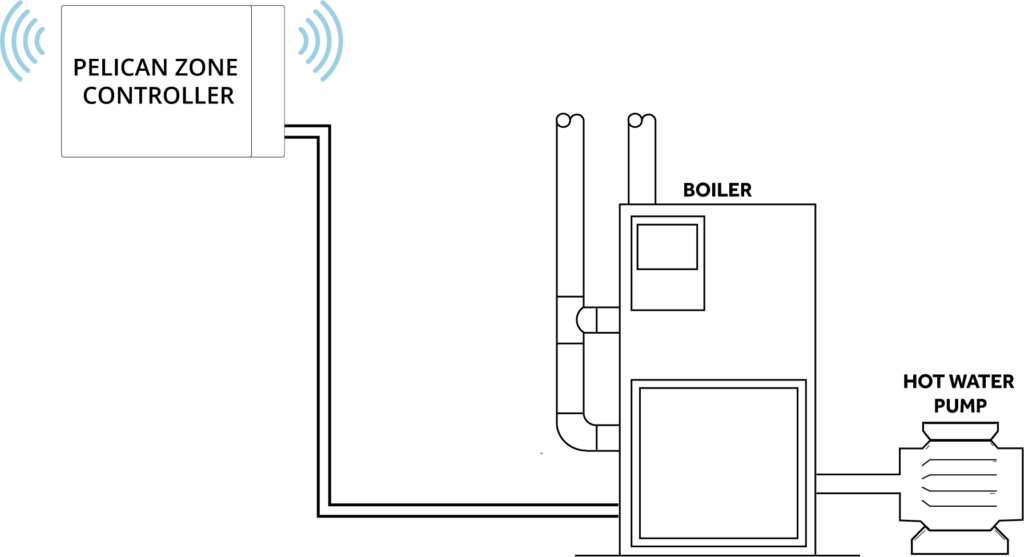
Boiler Control Features:
Pelican thermostats (TC or TS Series) can be configured to communicate their heating demand to a Pelican zone coordinator (Z8 or Z24) that manages a boiler. The zone coordinator uses this information to optimize the output of the boiler to positively affect the overall building’s climate.
ON-DEMAND
START/STOP
The Pelican zone coordinator is linked to Pelican thermostats (TC or TS series) to receive requests for the boiler to operate. This increases the building’s efficiency because the boiler will only run when the building has heating demand.
SUPPLY WATER TEMPERATURE
Depending on the application, Pelican can reset the boiler supply temperature either based on building demand, the outside air temperature, or a return water temperature sensor.
The Pelican zone coordinator (Z8 or Z24) has a variety of control safeties to help prevent mechanical issues from occurring. Included with these safeties are a full suite of fault detection and diagnostic notifications to help you identify when a mechanical problem has been detected.
Cooling Tower Controller and Coordinator
In applications, where there are one or more cooling towers, a Pelican zone coordinator (Z8 or Z24) can be used to enable and reset the output of the cool tower(s). The most common application is a WSHP condenser water-loops.
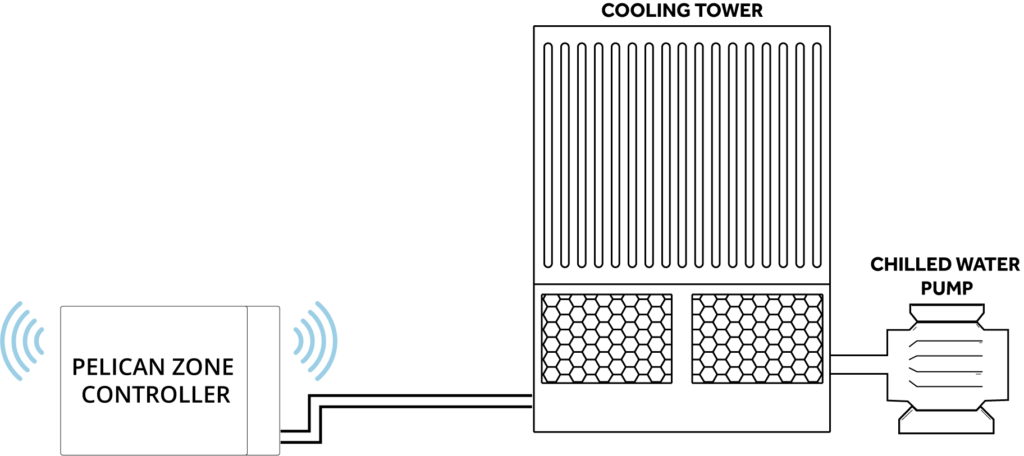
Cooling Tower Control Features:
RETURN SENSOR
With most cooling towers being used on WSHP condenser loops, the Pelican zone coordinator is linked to a Pelican thermostat monitoring the condenser water-loop’s return temperature. If the return water temperature rises above a pre-determined set point, the thermostat will send a request to the Pelican zone coordinator to turn the cooling tower On.
TARGET
DISCHARGE WATER TEMPERATURE
Depending on the cooling tower’s equipment features, the zone coordinators can enable spray pumps, a constant speed fan, or modulate a fan to maintain a target discharge water temeprature.
Chiller Controller and Coordinator
In applications, where there are one or more chillers, a Pelican zone coordinator (Z8 or Z24) can be used to enable and reset the output of the chiller(s). The most common applications are for two-pipe or four-pipe climate systems.
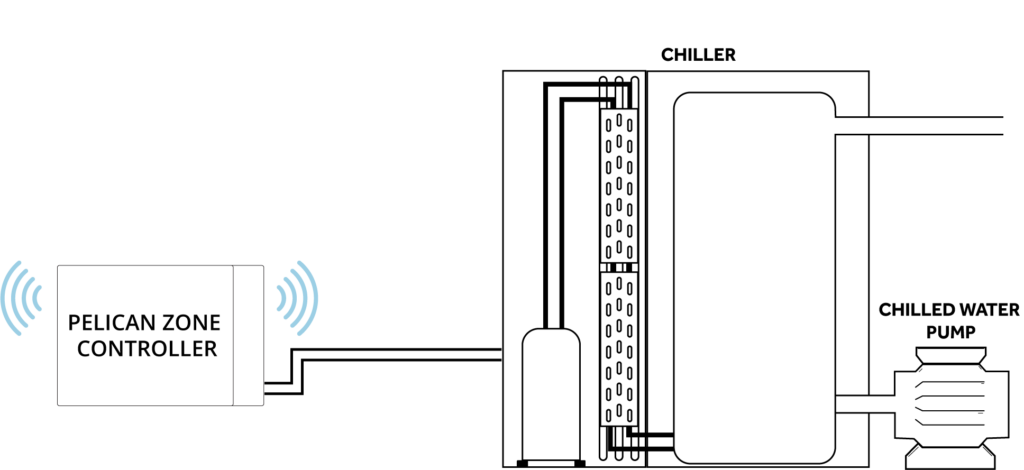
Chiller Control Features:
Pelican thermostats (TC or TS Series) can be configured to communicate their cooling demand to a Pelican zone coordinator (Z8 or Z24) that manages a chiller. The zone coordinator uses this information to optimize the output of the chiller to positively affect the overall building’s climate.
The Pelican zone coordinator is linked to Pelican thermostats (TC or TS series) to receive requests for the chiller to operate. This increases the building’s efficiency because the chiller will only run when the building has cooling demand.
Depending on the application, Pelican can reset the chiller’s supply temperature either based on building demand, the outside air temperature, or a return water temperature sensor.
| Additional Application
Exhaust Fan Building Pressure Controller
In application, where one or more exhaust fan are installed, the Pelican zone coordinator (Z8 or Z24) can be used to maintain a slightly positive building pressure through enable and modulating either an exhaust fan or an exhaust damper.
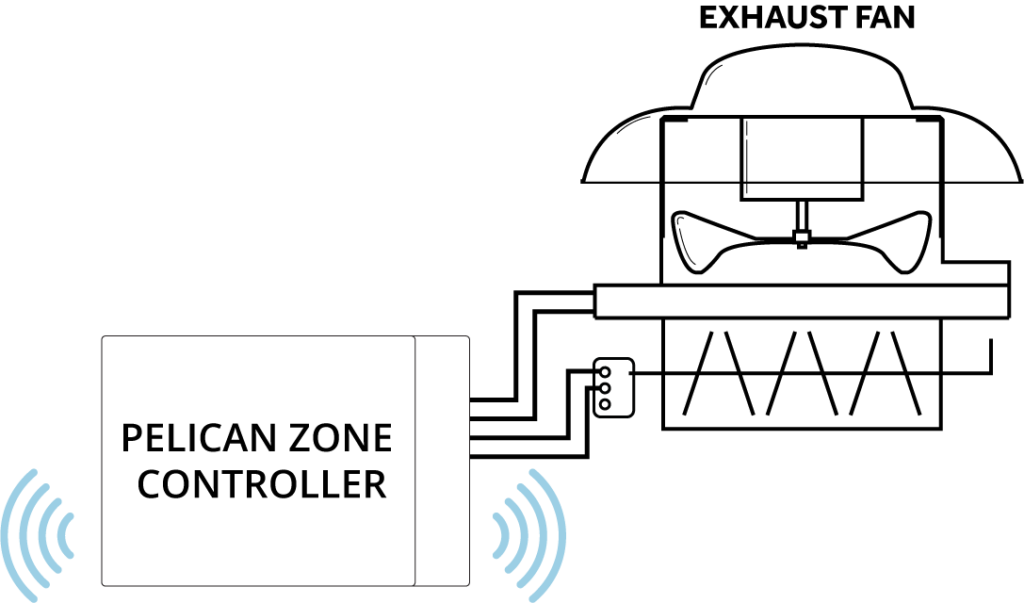
| TechnicalSpecifications
MODELS
Z8: 2 to 8 Thermostats Z24: 9 to 30 Thermostats
OUTPUT MODULE DIMENSIONS
in: 8 X 5.25 X 2 mm: 203 X 133 X 51
ANTENNA DIMENSIONS
in: 4.5 X 3.5 X 1 mm: 114.3 X 89 X 25.4
POWER
24 VAC, 60 Hz, 50mA
OPERATING VOLTAGE RANGE
23 - 30 VAC
RELAY CURRENT RATING
2.0A running (Y, Y2, Y3, W, W2, W3, G, G2)
MOUNTING
Output Module: Designed to be mounted horizontal or vertical. Antenna: Designed to be mounted horizontal on an interior wall or electrical box.
OUTPUTS
A1: 0-10VDC; adjustable range A2: 0-10VDC; adjustable range A3: 0-10VDC; adjustable range A4: 0-10VDC; adjustable range Y, Y2, Y3, W, W2, W3, G: 24 VAC G2: 24 VAC (Enables during economizer and demand ventilation cycles).
INPUTS
S1: 0-10 VDC feedback; for outside damper fault detection. S2: 0-10VDC feedback; for future use. T1: 10K Type II Temperature Sensor Input or Dry-Contact Input **T2:**10K Type II Temperature Sensor Input or Dry-Contact Input T3: 10K Type II Temperature Sensor Input or Dry-Contact Input HIGH: Duct or Building Static Pressure LOW: Ambient or Outdoor Static Pressure
TEMPERATURE DETECTION RANGE
-20°F to 180°F
DIFFERENTIAL PRESSURE DETECTION RANGE
0.0" W.C. to 8.0" W.C.
CODE COMPLIANCY
Meets California Title 24 Code. Follows ASHREA Economizer and Ventilation standards.
ADD TA1
The Z8 and Z24 can accept a TA1 to provide an additional 10K Type II Temperature Sensor Input or Dry-Contact Input.
ANTENNA TO OUTPUT MODULE WIRE LENGTH
Up to 500 feet between Antenna and Relay Module.
WIRELESS
2.4GHz wireless frequency, IEEE 802.15.4 wireless standard. Complies with Class B Part 15 of FCC rules. Does not interfere or communicate with WiFi/802.11 networks. Pelican Mesh Network Enabled.
SYSTEM PROTECTIONS
Supply Low Limit Temp Reset Supply High Limit Temp Reset High Static Pressure Reset Low Static Pressure Reset Mixed Air Low Limit Safety Outside Compressor Lock-Out Proof of Fan
ALERTS AND NOTIFICATIONS
Free cooling enabled indication. Economizer enabled indication. Compressor enabled indication. Heating enabled indication. Number of Compressor enabled indication. Number of Heat Stages enable indications. Temperature sensor readings. High Temperature Notification. High Static Notification Low Static Notification Air temperature sensor failure/fault. Not economizing when it should. Economizing when it should not. Outside Damper not modulating. Excess outdoor air. Dry-Contact input to notification.
OPERATING RANGE
-4°F to 160°F 5 to 90 % Relative Humidity (non-condensing)
STORAGE
-20°F to 160°F
A1: 0-10; VDC; adjustable range. A2: 0-10VDC; adjustable range A3: 0-10VDC; adjustable range A4: 0-10VDC; adjustable range Y, Y2, Y3, W, W2, W3, G: 24 VAC G2: 24 VAC (Enables during economizer and demand ventilation cycles).
| ProductDocumentation
Installation Guides
Datasheets
Application Guides
LEARN MORE
DISCOVERMOREPELICAN
HEAR THEIR STORIES
PELICANIMPACTSOTHERS

With hundreds of thousands of customers using Pelican, we want you to hear some of their stories.